
Introduction to Withdrawal Management
Please note: This article summarises legal requirements for orientation purposes only. It is not legal advice. If you need advice on your individual obligations, we recommend consulting a lawyer.
What is Withdrawal Management?
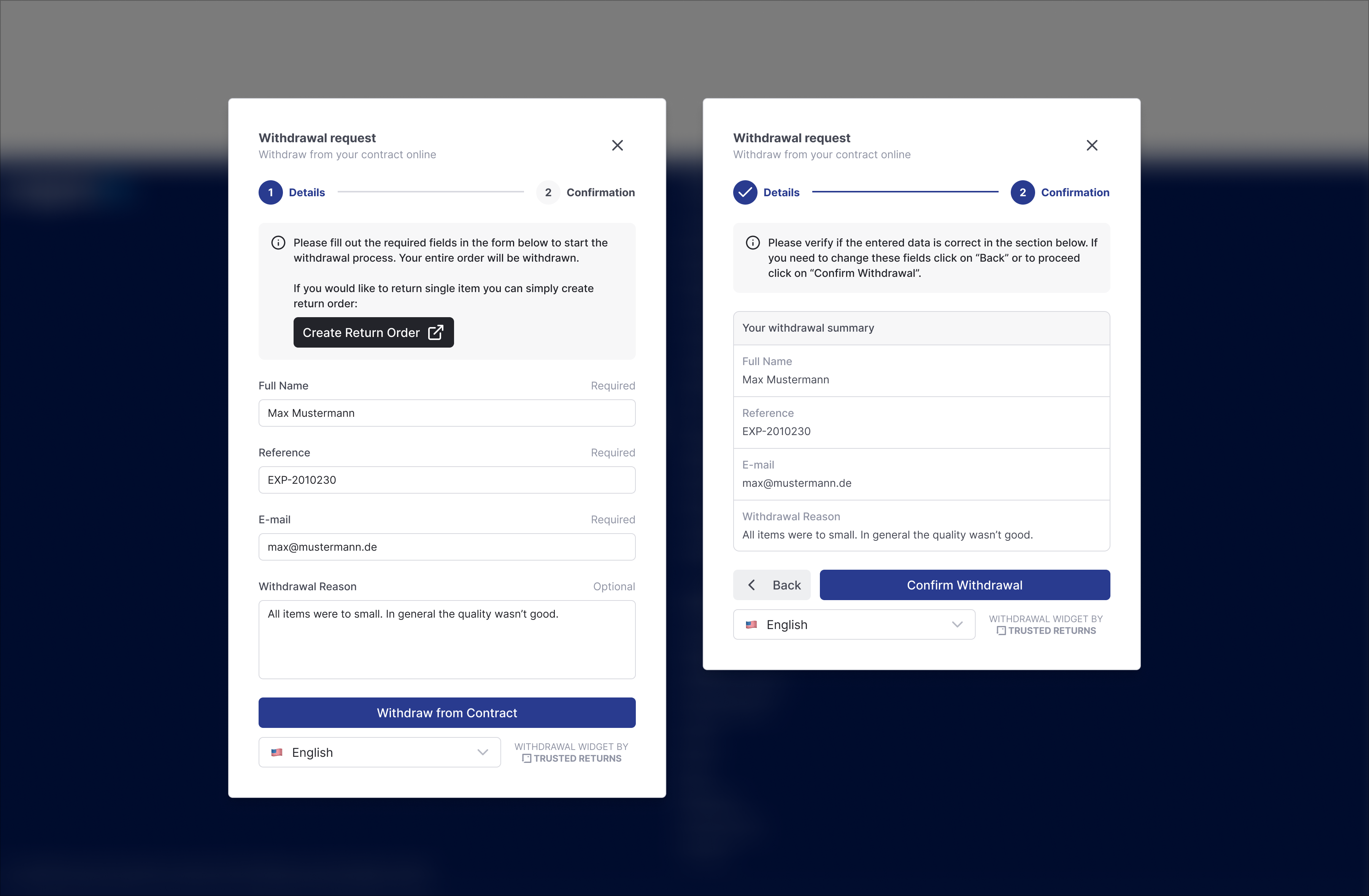
Withdrawal Management is a module of the returns.cloud platform that lets your online shop offer a legally compliant electronic withdrawal function to customers. Customers can declare the withdrawal from a contract (for example an online order) directly in your shop, without logging in, via a withdrawal button and a guided two-step form.
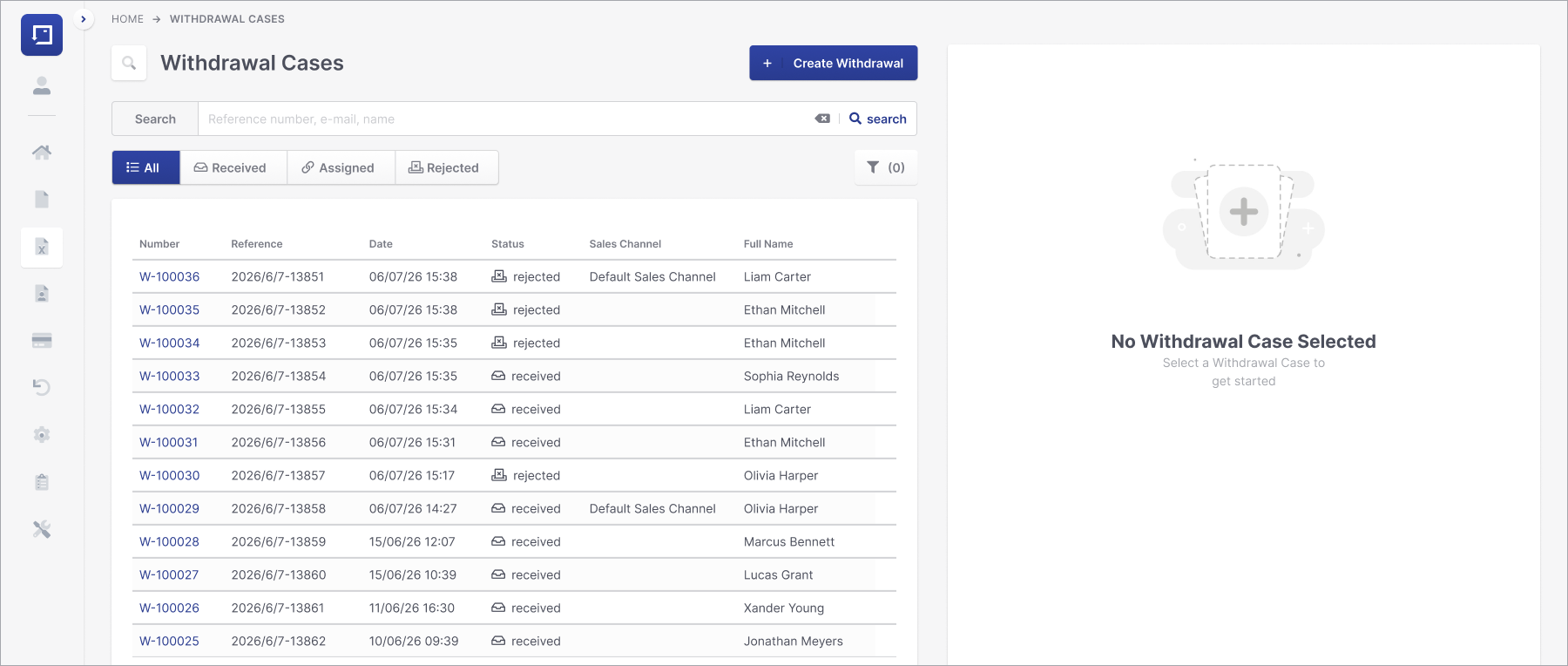
Every submitted withdrawal becomes a withdrawal case in the Management Portal, where it is either matched to an order automatically or handled manually by your team. From an assigned withdrawal case, a return of type "Withdrawal" can be created, so the case flows seamlessly into your existing post purchase process, including tracking, tracing and credit note handling.
Why does this module exist? The legal background
The obligation to provide an electronic withdrawal function originates at EU level. Directive (EU) 2023/2673 of 22 November 2023 (official text on EUR-Lex) amends the Customer Rights Directive 2011/83/EU and inserts a new Article 11a, which obliges traders to provide a withdrawal function for all distance contracts concluded with consumers via an online interface (websites, shops, apps), wherever a statutory right of withdrawal exists.
In Germany, the directive is transposed through the new section 356a of the German Civil Code (BGB). The implementing act was published in the Federal Law Gazette on 5 February 2026 (BGBl. 2026 I No. 28, available via https://www.recht.bund.de).
Compliance deadline: 19 June 2026. There is no transition period beyond this date.
If your shop concludes distance contracts with customers, you must provide this function by that date.
Does this apply across the EU?
Yes. Because the obligation comes from an EU directive, it applies in all EU member states, not only in Germany:
- All member states had to adopt national implementing rules and must apply them from 19 June 2026.
- Each country transposes the directive into its own national law. In Germany this is section 356a BGB; other member states have their own equivalent provisions (for example Austria implements it in the Fern- und Auswaertsgeschaefte-Gesetz, FAGG).
- Practical consequence: If you sell to customers in several EU countries, the withdrawal function is required for all of these markets. The core requirements (two-step procedure, permitted fields and receipt confirmation) are the same everywhere because they are harmonised by the directive; details of national wording can differ slightly.
The widget covers the harmonised requirements and supports multiple languages, so one integration can serve all EU storefronts. For country-specific legal fine-tuning (for example the exact button wording in a local language), consult your legal counsel.
The mandatory two-step procedure
The law prescribes a two-step procedure (section 356a paragraphs 1 and 3 BGB; Article 11a of Directive 2011/83/EU as amended by Directive (EU) 2023/2673), which the withdrawal widget implements out of the box:
- Withdrawal function: A clearly legible button labelled "Withdraw from contract" (or an equivalent unambiguous wording) must be permanently available, prominently placed and easily accessible in your shop. Clicking it opens a form where the customers enters their details.
- Confirmation function: The customer is shown a summary of the entered data together with a button labelled "Confirm withdrawal" (or equivalent). Only clicking this second button submits the withdrawal and makes it legally effective.
Which fields may be requested?
Section 356a paragraph 2 BGB conclusively defines which information may be requested as mandatory input:
- Customer's name
- Information to identify the contract, for example the order number
- An electronic communication medium for the receipt confirmation, for example an email address
Important: A reason for the withdrawal must not be a mandatory field. The widget therefore offers the reason as an optional field only. No additional mandatory fields are permitted by law.
Receipt confirmation
You must confirm receipt of the withdrawal without delay on a durable medium. returns.cloud sends this confirmation automatically by email. The confirmation contains the content of the withdrawal declaration as well as the date and time of receipt, as required by section 356a paragraph 4 BGB. See the article Email Communication and Templates for details.
Withdrawal period
The statutory withdrawal period is generally 14 days. The start of the period depends on the type of contract:
- For goods: from receipt of the delivery
- For services: from conclusion of the contract
If the customer was not properly informed or the withdrawal function is missing, the period extends to up to 12 months and 14 days (see section 356 paragraph 3 BGB).The deadline used by the automatic checks is configurable per widget.
How returns.cloud determines the deadline: based on the actual delivery
For goods, the statutory period does not start with the order or the shipping date, but only when the customer (or a third party designated by the customer) actually receives the goods (see sections 355 paragraph 2 and 356 paragraph 2 BGB).
Because returns.cloud manages the complete post purchase process including tracking and tracing, the platform knows the actual delivery or handover date from the carrier events linked to the order. The withdrawal deadline check therefore uses the real handover to the customer as its starting point.
returns.cloud determines the delivery at item level, not just per order. This matters for orders shipped in multiple parcels: by law, if goods from one order are delivered separately, the withdrawal period only starts when the last item has been received (see section 356 paragraph 2 BGB). Because every item carries its own verified delivery event, the deadline is resolved correctly even for multi-parcel orders and partial deliveries. The same applies in a marketplace context when the marketplace version of returns.cloud is used, where items of one order can be shipped by different sellers.
If no delivery event is available for an order, for example because the carrier did not report one, the platform runs a multi-stage verification to determine the correct delivery date. If the date still cannot be established, a configurable fallback applies. In the worst case the withdrawal case is routed to your customer service team for manual review instead of being decided automatically. A withdrawal is never auto-rejected on the basis of a guessed date.
This is a key difference to simple withdrawal buttons or standalone web forms that are widely seen on the internet. Such solutions can only collect the declaration; they cannot evaluate the statutory period at all, or they approximate it from the order date, which systematically miscalculates the period. With returns.cloud, an automatic rejection with the reason "period expired" is only issued when the period calculated from the verified actual delivery has genuinely ended. This protects you in both directions: valid withdrawals are not wrongly rejected, and expired ones do not slip through into manual processing.
Permanent display of the button is allowed
In theory the button only has to be available during the individual withdrawal period of each customer. In practice a shop cannot know this period for an anonymous visitor. The explanatory memorandum to the German implementing act (Regierungsentwurf, Federal Ministry of Justice) expressly permits providing the withdrawal function permanently and across the board in this case, and clarifies that the permanent display neither extends the withdrawal right nor misleads customers. This is exactly how the widget works: the button is always available, and submissions after the deadline are rejected automatically with the reason "period expired" once the case has been matched to an order.
Accessibility without login
If a contract can be concluded without a customer account (guest checkout), the withdrawal function must also be accessible without login. No access barriers such as a password or a login wall are allowed in this standard case. The widget therefore works completely without authentication.
Exception: According to the explanatory memorandum to the German implementing act (see source above), providing the withdrawal function exclusively inside the login area can be sufficient if the contract itself can only be concluded with a customer account. Since the widget works without login anyway, you are covered in both scenarios without additional effort.
In addition, the widget can be embedded in your logged-in customer area with prefilled data for extra convenience. See "Integrating the Widget into Your Shop".
Withdrawal vs. return
It is important to distinguish the concepts within the platform:
- Withdrawal: The statutory right of the customer to withdraw from the contract within the legal period. It is a legal declaration and must be documented.
- Voluntary return: The operational process of sending goods back, which your organisation offers as a service, under conditions you define.
- Withdrawal return: The dedicated return that follows an accepted withdrawal. It is governed by the statutory withdrawal, not by your voluntary return conditions, and is always marked as such.
A withdrawal case can (and usually will) result in a withdrawal return, but case and return remain separate objects linked to each other for full traceability. returns.cloud deliberately keeps the legal declaration, the withdrawal return and the voluntary return apart: the customer never lands in a mixed flow, and your team always sees unambiguously which type of process it is handling.
How the pieces fit together
- Shop frontend: The withdrawal widget (button and modal) is embedded in your shop or in your logged-in customer area.
- Management Portal: The "Withdrawal Cases" section is where your team monitors, assigns, rejects and completes cases. Unmatched cases are highlighted on the dashboard.
- Emails: returns.cloud sends the receipt confirmation and status emails to the customer, branded like your returns portal emails.
- Self-Service Portal: Optionally, after a successful withdrawal the customer is redirected into the Self-Service Portal to continue with the return process.
Legal sources
The statements in this article are based on the following official sources:
- Section 356a BGB, official consolidated text (Federal Office of Justice): https://www.gesetze-im-internet.de/bgb/__356a.html
- Directive (EU) 2023/2673 of the European Parliament and of the Council of 22 November 2023, official text (EUR-Lex): https://eur-lex.europa.eu/legal-content/EN/ALL/?uri=CELEX%3A32023L2673
- German implementing act: Gesetz zur Aenderung des Verbrauchervertrags- und des Versicherungsvertragsrechts sowie zur Aenderung des Behandlungsvertragsrechts, published 5 February 2026, BGBl. 2026 I No. 28 (available via the Federal Law Gazette at https://www.recht.bund.de)
Disclaimer: This article summarises the legal requirements for orientation purposes only and does not constitute legal advice. If you need advice on your individual obligations, for example on the correct wording, placement or scope for your specific shop and markets, we recommend consulting a lawyer.
Next steps
- Integrating the Widget into Your Shop
- Email Communication and Templates
- Processing Withdrawal Cases
- Self-Service Portal Handover
- Activity Log and Data Retention
- Reference: Configuration Parameters, Statuses and Rejection Reasons